Voip
Zoom Security
Updated 2025-09-19
Not secure by default
Zoom default settings are not secure.
You must enable security features before scheduling or starting any meeting.
Prior to meeting / scheduling
Must do
- All meetings should be password-protected but keep in mind that invitation links contain the meeting password by default.
- Never share meeting links which include the password publicly.
- Never make registration available to anyone with any email.
- Disable "Join Before Host" setting to prevent participants from joining the meeting without the host.
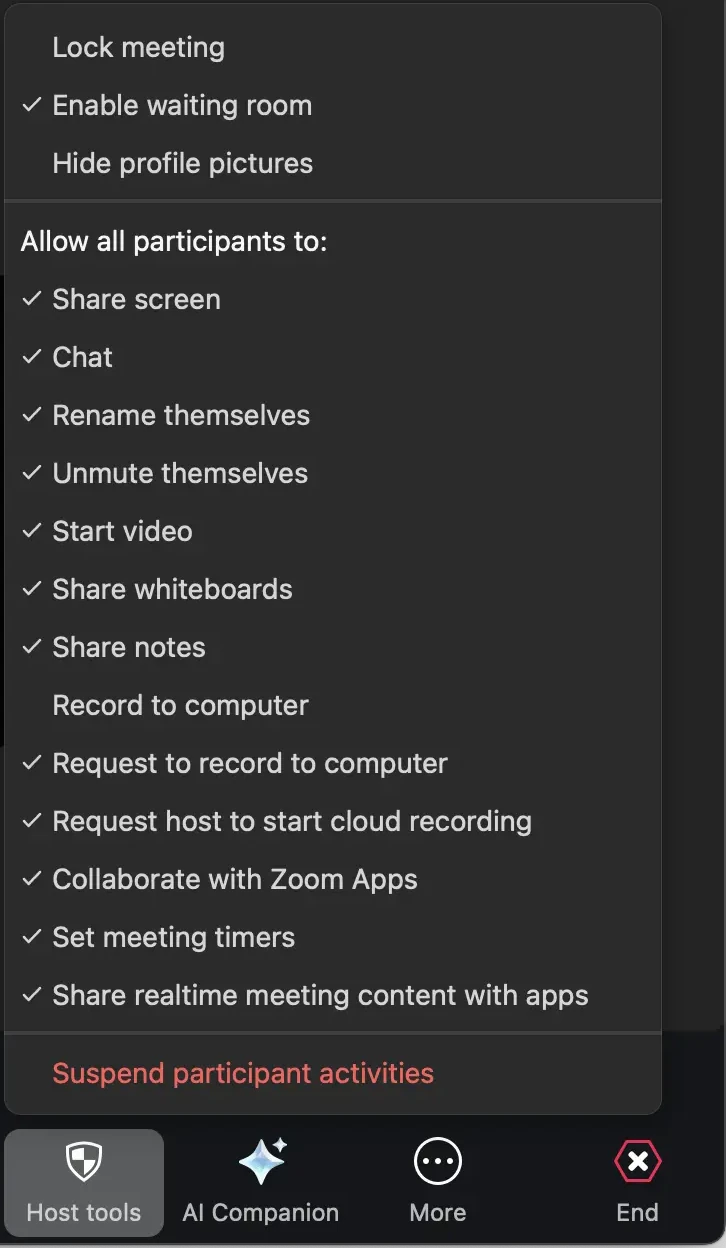
- Hosts must be familiar with Zoom's "Host tools", which are available during a meeting. Any user can start a meeting in their personal room to familiarize themselves with these tools. They include:
- "Lock meeting"
- "Hide profile pictures"
- "Suspend participant activities"
Consider
- Only allow participants who are logged in to join.
- Only allow participants who are logged in and part of a specific domain (ucsf.edu) to join.
- Use the "Waiting Room" feature. Allows hosts to decide if and when a participant can join the meeting.
- Strongly recommended to include one or more co-hosts in the meeting, who can help manage participants and respond in real-time if needed.
During a Zoom meeting
- Hosts should be ready to use the "Host tools" as needed.
- No meeting should be left without a host or co-host. A host can assign someone they trust as a co-host if they need to leave or for extra help managing the meeting.
- Leaving an insecure meeting and re-joining without making any changes does not help in any way.